How Dormilo works

Three minutes of setup in daylight, then one button at bedtime. Here is everything that happens between “Once upon a time” and sleep.

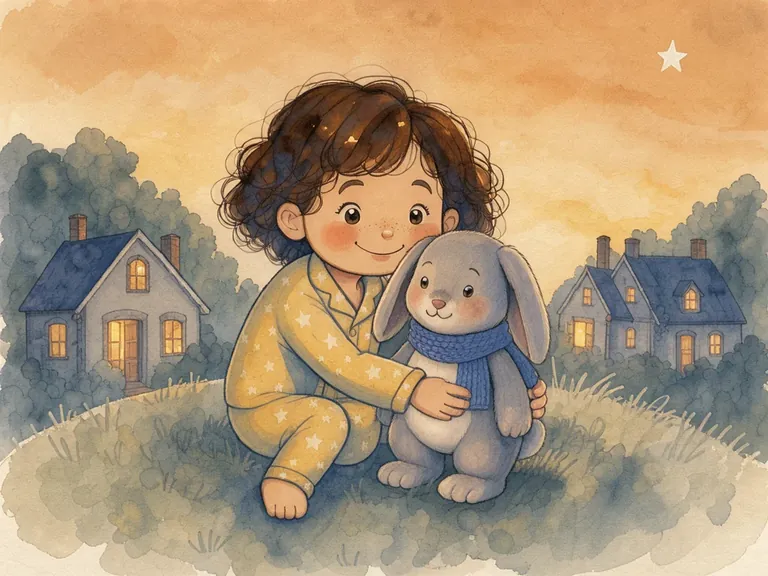
Watercolour illustration: a curly-haired girl hugging her grey plush bunny on a grassy hill at sunset, a cottage with lit windows behind them.
A real page illustration from Dormilo's pipeline, painted for a fictional girl, Ema (5).

1. Setting up: about three minutes, for a grown-up

Best done in daylight, without your child on your lap. Every step has a sensible default.

First, how the AI is used

Before you type anything, the app explains which services write, illustrate and read the stories, and what each one receives. If you’d rather not, you can still listen to the sample library.

Your child, in a few words

A first name or nickname, their age and how the story should refer to them (she, he or they). You hear the narrator say “Goodnight” with the name and can fix how it’s pronounced. In Czech, Slovak and Polish you confirm the forms of the name the story will use, such as the one for calling someone.

The hero’s look

Pick hair, skin tone, eyes, glasses or freckles. Dormilo paints a portrait for you to approve. It never asks for a photo of your child.

What they love, and a cuddly friend

Dinosaurs, trains, the sea, ballet: a few things your child loves, and the toy that goes to bed with them. The cuddly friend joins every story.

Bedtime

Set your child’s usual bedtime. The calm evening mode starts an hour before, and a gentle reminder can come fifteen minutes before. Your first story is already being written in the background.

2. Every evening

Tonight’s story

With Pro, the next chapter is prepared about an hour and a half before bedtime and downloads to your phone, so at bedtime it starts at once. It is only prepared on evenings you are likely to use it: if the app hasn’t been opened for two days, or the last two prepared stories weren’t played, it waits until you ask.

Or make a new one

Choose who’s in it, what it’s about, today’s moment or a big feeling, a one-off or a new series, the length, the voice and the picture style. Everything is filled in already, so creating a story is one tap.

It starts in seconds

A short settle-in intro plays straight away while the first page is written. The story then arrives page by page, ahead of the narration, so there is no spinner to stare at. If a story can’t be finished, it doesn’t count, and you can try again or play one from your library.

3. The story

Listen

Lock the phone and the story keeps playing, with the controls on the lock screen (it shows the series, never your child’s name). After half a minute without a touch, the screen turns into a dark curtain with a slowly breathing moon. One tap brings the controls back.

Read together

Page by page with the pictures. Each word lights up as the narrator reads it, and a tap on a word plays it again. Swipe or tap the edge to turn the page.

Word of the night

Optional. One to three words in another language, used two or three times in the story so their meaning is clear from the context, with a little glossary at the end. English for stories in other languages; Spanish, French or German for English stories. It is a sprinkle of words at bedtime, not a language course.

4. Drift

Goodnight

A spoken goodnight to your child and their cuddly friend, a three-second cross-fade into the soundscape, your sleep timer, then a one-minute fade to silence. The audio is released, so other apps can play, and the screen brightness is restored.

How many stories a night

One, two or three, your choice. The second is about three minutes, the third a two-minute lullaby of a story. At the limit the app says “That’s all the stories for tonight”, never an offer. A grown-up can allow one more through the parental gate.

5. The morning after, and the nights to come

A morning check-in

How was last night? “Fell asleep”, “It was fine” or “Unsettled”, plus a tap for “too exciting”, “too long” or “loved Bubu”. Tomorrow’s story takes it into account.

A growing world

Characters, places and small facts from the stories gather in your child’s world. A star appears for every story night, and finished series become constellations. There are no streaks, so nothing can be lost or broken.

A library that plays offline

Stories, series and favourites, saved with their pictures and narration. To save space, narration older than 90 days is cleared from the phone; the text and pictures stay, and the audio comes back with a tap.

Share with family

Send a story as an audio file to grandparents, or for the car. Your child’s name goes only where you send it.

About the AI

Written, illustrated and read aloud with AI. Here is who does what:

  • Writing and safety checks. OpenAI language models plan and write each story, and check what you type and every page before it is read aloud. They run on Microsoft Azure OpenAI, reached through OpenRouter, with zero data retention. They never see your child’s real name.
  • Illustrations. FLUX image models by Black Forest Labs, through its EU service, with fal.ai as a backup. They get a description of the scene and the characters’ looks, never a name or a photo.
  • Narration. Soniox text-to-speech in the EU. It receives the finished page, including your child’s name, so it can read it aloud, and stores nothing.
  • Our own checks. Bedtime rules in code on every page (sentence length, nothing frightening late in the story), plus checks on every picture before you see it.

Every picture carries a machine-readable mark saying it was made by AI, and so does each story’s data. AI can occasionally get something odd or wrong, which is why every story, page and picture has a Report button. More on safety and privacy and in the privacy policy.

More about how it works

How long does a new story take?

The settle-in intro starts at once and the story follows within seconds, page by page. With Pro, tonight’s story is prepared before bedtime, so there is no wait at all.

Can my child use Dormilo alone?

Dormilo is made to be set up and run by a parent. Your child chooses tonight’s adventure, turns pages and taps words; everything else (settings, purchases, deleting, links out of the app, sharing and stories beyond tonight’s limit) sits behind a parental gate.

Which devices does it work on?

iPhone, iPad and Android phones and tablets. Stories keep playing with the screen locked.

Can I listen to a story more than once?

As often as you like. Replays and favourites never count toward anything.

A calmer bedtime starts tonight.

Your child’s own story, a new chapter every evening, read aloud until sleep. The first story is free, no card needed.

Coming soon tothe App Store Coming soon toGoogle Play